
Set the scope before cleaning the list
Job lists grow as projects open, teams change, and old work returns for a final visit. Two codes may describe the same project, a completed job may remain available, or a vague name may send hours into a catch-all bucket. These are classification problems to investigate, not reasons to rewrite time records automatically.
Choose an owner for the job list and ask supervisors, payroll, and the people using the codes to review it together. Define the work dates and systems included: web punching, mobile entry, schedules, reports, and any accounting or billing handoff that relies on the same identifiers. Keep the same date range and employee population when comparing reports.
A sensible internal starting point is to review recently used jobs, open projects with no recent time, and completed projects that still receive entries. Choose a lookback period that fits the operation. Seasonal or warranty work can explain an apparently unused code; lack of recent time alone does not prove it should be retired.
Keep the original evidence. Retain an approved before-change snapshot of the code register and reporting totals. Use your normal backup and change process before altering configuration. A saved worksheet is a review aid, not a substitute for a recoverable system backup.
Build a register employees and reviewers can understand
Use one row per job record. Record both the system identifier and the code employees recognize; they may serve different purposes. Where another system has its own identifier, document that mapping explicitly rather than assuming the visible name is a reliable key.
| Field | What to record | Review question |
|---|---|---|
| Identity and meaning | Record ID, employee-facing code, name, customer or work order, and description | Can someone distinguish this job from similar work? |
| Ownership and dates | Responsible supervisor, status, project dates, and last confirmed use | Who can confirm whether more work is expected? |
| Entry behavior | Eligible employees, available tasks, default task, and entry methods tested | Can the intended employees choose the right combination? |
| Decision and mapping | Keep, clarify, retire, or investigate; future code; effective point; approver | Does the decision preserve the meaning of historical time? |
| Evidence and retest | Change reference, before/after totals, observed results, and reviewer | Did the saved change produce the expected result? |
A useful display name tells employees which work they are selecting without exposing unnecessary customer details. Pair a stable code with a concise description and a supervisor who can resolve uncertainty. Avoid reusing an old code for unrelated new work when it would make a historical report ambiguous.
Separate job identity from the task performed. A project may need installation, inspection, and travel categories without becoming three unrelated projects. Ask how the operation wants to review time before creating extra codes simply to make a report look more detailed.
Make a decision for each exception
Keep a code when its purpose, owner, and use are correct. Clarify a confusing label after checking how the change will appear in past reports and connected systems. Retire from future entry when the project owner confirms the work is finished. Investigate apparent duplicates and unexplained entries before deciding what to consolidate.
In TimeTrex, the Jobs documentation describes a numeric Code used by employees when punching, separate Name and Description fields, and job statuses including Active, On Hold, Completed, and Disabled. Active jobs appear in the normal punching job list; the documentation says all statuses remain available when adding or modifying a punch in the timesheet. Test both workflows when reviewing a retirement decision.
The same guide describes Employee Criteria and Task Criteria. Review those settings alongside the job status and default task. A correctly named job can still produce poor entries if the wrong employees can select it or its default task no longer matches the work. Availability depends on your edition, permissions, and configuration.
Document future-entry mappings separately from historical corrections. If two records look alike, first confirm their customers, work orders, tasks, and reporting dependencies. Do not merge or delete records simply because their display names match. When past time is genuinely misclassified, use the approved correction process and retain the reason and review trail.
Test the change where employees enter time
Agree on a clear cutover point, communicate the replacement choices, and assign someone to answer questions during the first shift. Have an authorized administrator apply approved changes. Use an appropriate test environment or authorized sample records where possible, and keep changes away from an active payroll deadline when practical.
- Check the starting choice. Can the intended employee select the correct job and task through each entry method actually used?
- Check a mid-shift transfer. Verify the job and task on both sides of the transfer, with no extra or missing worked time.
- Check the retired choice. Confirm expected behavior in the normal punch list and in authorized timesheet editing.
- Check the handoff. Review downstream reports and any connected export using the same period, employees, categories, and mapping.
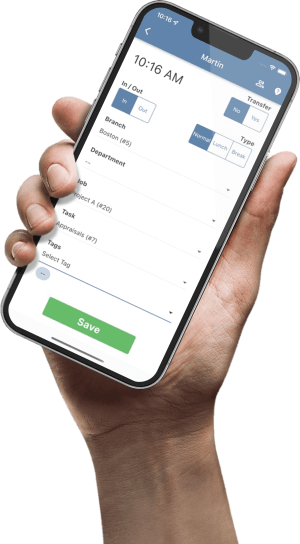
The official TimeTrex punching guide documents Transfer punches for changing a branch, department, job, or task in one operation. Confirm the recorded allocation rather than treating a successful punch as proof that the intended job received the hours.
Keep an explicit unresolved bucket during review. Never move unknown time to the largest project merely to eliminate a blank field. Record the employee, date, questioned segment, accountable supervisor, and resolution. If a code change causes unexpected behavior, use the approved recovery route and investigate the same change instead of creating another near-duplicate code.
Worked example: reconcile 40 hours after a code review
Consider a fictional maintenance team reviewing one employee's approved 40-hour week. Two job records, 101 and 102, appear to describe the same site. Record 103 is a separate service job. The review finds 22 hours on 101, 10 hours on 102, and 8 hours on 103.
| Recorded job | Approved hours | Review treatment |
|---|---|---|
| 101 — Site maintenance | 22 | Keep as the future-entry choice after owner confirmation |
| 102 — Maintenance site | 10 | Investigate; map to the same project in the review only after confirmation |
| 103 — Service call | 8 | Keep as a separate job |
If the owner confirms 101 and 102 represent the same project, a documented management-report bridge can show 22 + 10 = 32 hours for that project and 8 hours for service work. The control total is still 32 + 8 = 40 hours, matching the original 22 + 10 + 8. Retain the original record-to-project mapping so a reviewer can explain the 10-hour difference between the raw and combined views.
That reporting bridge does not itself change saved punches, employee pay, invoices, or accounting entries. Each of those requires its own approved treatment. If the codes represent different contracts, leave them separate even when the names look similar. Close the finding only after the owner has confirmed the meaning and the chosen future-entry behavior has been retested.
For a separate explanation of wage pools and department-level calculations, see our labor cost allocation worked example. This audit addresses the identifiers behind time classification; the allocation guide addresses how defined costs are distributed.
Job code audit sign-off checklist
Use the checks as a reading aid. They reset when the page reloads; keep the durable decisions and evidence in your organization's approved tracker.
Set the next review when you sign off. A periodic review plus checks at project close can be useful internal practices, but choose the cadence for your own operation. Track unresolved items separately so one confusing code does not disappear inside an otherwise completed cleanup.
Common questions
Should we delete every unused job code?
No. Confirm whether seasonal work, adjustments, historical reports, or connected systems still depend on it. Decide how to restrict future entry through an approved configuration change, and verify historical behavior before considering deletion.
Can two similar job names be combined automatically?
Similar names are a review signal. Compare record IDs, customers, work orders, tasks, and reporting dependencies first. Record any approved reporting mapping separately from changes to saved time.
Does a completed job disappear from every TimeTrex screen?
The Jobs guide distinguishes normal punching, where Active jobs appear, from adding or modifying timesheet punches, where all statuses are available. Verify the actual employee and supervisor workflows in your configuration.
What proves the cleanup is finished?
A saved code list alone is insufficient. Confirm the expected entry behavior, reconcile the defined report totals, retain the mapping and approvals, and assign an owner to any unresolved exception.
Connect clear job codes to useful labor reports
Explore TimeTrex job costing and bring a sample of your code list, time-entry workflow, and reporting needs.
Request a TimeTrex demoSources and product notes
Official TimeTrex pages checked November 2, 2026. The register, cutover workflow, review cadence, and 40-hour example are proposed operating practices. Confirm available controls in your edition and configuration.
- Jobs — code fields, statuses, employee criteria, and task criteria.
- Punching In/Out — job/task selection and transfer behavior.
- Job costing — product context for tracking project time and associated labor costs.