
First, identify what looks duplicated
“Duplicate punch” can describe several different problems. A repeated clock event, overlapping time intervals, and the same hours appearing in two views need different checks. Start by naming the pattern so the reviewer knows what to investigate.
A repeated clock event
Two IN entries a few seconds apart may come from a second attempt, a correction, or an import. Compare the employee identifier, event time, IN/OUT status, punch type, and source information available in your system. The date and time alone are too weak a match, especially when a report displays only whole minutes.
Two intervals covering the same minutes
A punched shift and a separately entered block of hours may appear to cover the same work. Check whether the second record is an additional saved entry or merely another display of existing time. In TimeTrex, the timesheet guide explains that red Worked Time in one timesheet view can indicate hours originating from the other view. Seeing hours in both places does not by itself establish duplication.
A valid event that resembles a duplicate
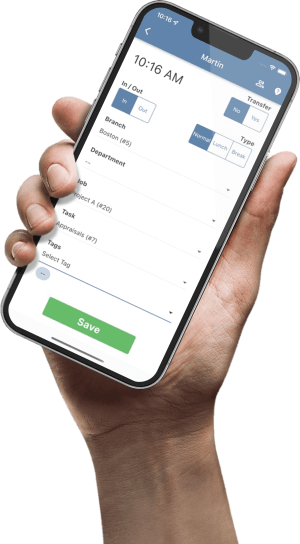
A worker changing jobs or departments may generate closely spaced records for a legitimate reason. TimeTrex’s punching guide describes a Transfer option for changing a branch, department, job, or task in one operation. Review the allocation and punch type before treating a mid-shift event as an accidental retry.
Use one time basis. Check full dates and time zones, including the next calendar day for overnight work. A repeated local clock time during a daylight-saving transition can represent different instants. Resolve the time basis before comparing the records.
A five-step review before changing a timecard
- Save the starting evidence. Record the employee, work date, questioned record identifiers, source, and current totals. Keep the original export or approved record snapshot so the change can be explained later. A screenshot alone may omit seconds, dates, or allocation fields.
- Rebuild the sequence. Put clock events in time order. Compare IN/OUT status, normal/lunch/break types, transfers, and any manual entries. Distinguish when the work happened from when a record reached the system. Do not assume every second IN event is redundant.
- Confirm the work. Ask the employee and responsible supervisor which work and breaks actually occurred. Compare their explanation with available punch notes and operational records. A schedule helps frame the question, but does not establish the actual start or finish.
- Authorize the specific correction. Name the record to adjust, the evidence supporting that decision, and the expected effect. Follow your organization’s correction policy and permissions. If the evidence remains unclear, assign an owner and resolution deadline instead of guessing.
- Recheck the saved result. Review the punch sequence, daily and pay-period totals, exceptions, and job or department split. Then check any affected export or downstream system. A corrected source timecard does not prove an earlier file was replaced.
TimeTrex documents paired IN and OUT punches and exceptions when a corresponding punch is missing. Its timesheet guide also describes authorized punch editing. After a correction, check the complete sequence: removing one questioned event can reveal a pairing problem elsewhere.
Employees who need a change can use the Requests workflow, which includes Missed Punch and Punch Adjustment request types. Keep the explanation specific: identify the date, questioned event, actual work, and requested correction. Available actions depend on permissions and configuration.
Worked example: a 15-minute overlap in an export
Imagine a fictional review of employee E104’s staging file before payroll import. The employee and supervisor confirm work from 08:00 to 12:00 and 12:30 to 16:30. For this example, the 30-minute meal interval is unpaid, and no rounding is applied. These are example assumptions, not a universal meal or payroll rule.
| Row | Interval | Hours | Finding |
|---|---|---|---|
| A | 08:00–12:00 | 4.00 | Confirmed morning work |
| B | 11:45–12:00 | 0.25 | Same employee and job; investigated as a possible duplicate |
| C | 12:30–16:30 | 4.00 | Confirmed afternoon work |
The initial file totals 8.25 hours. The reviewer traces B to a repeated entry for the final 15 minutes of A, confirms there was no additional work, and records approval to exclude B from the corrected staging file. A and C remain intact. The evidence, rather than the overlap alone, supports that decision.
Before review: 4.00 + 0.25 + 4.00 = 8.25 hours
Confirmed work: 4.00 + 4.00 = 8.00 hours
Explained difference: 0.25 hour × 60 = 15 minutes
The reviewer checks that the corrected file contains two rows, totals 8.00 hours, and still assigns the work to the correct job. The review record links A, B, and C to the finding and explains the 0.25-hour change. This example describes an export review; it does not claim that TimeTrex would calculate these rows in a particular way.
Combining overlapping intervals can help quantify a question. It does not determine pay entitlement, overtime, premiums, or whether two records are duplicates. If payroll has already been processed, use the approved payroll adjustment process and review downstream effects before changing historical records.
Fix the repeat cause after resolving the record
A single correction helps today’s timecard. A small process change can make the next review easier. Track the confirmed cause separately from the initial suspicion: repeat taps, a manual replacement followed by a late-arriving original, or a file submitted more than once are different findings.
- Give employees a clear retry procedure. Explain how to check whether a punch succeeded and who to contact when the result is uncertain. Include the date, time, and entry method in the report.
- Check for the original before adding a replacement. When resolving a missing entry, review the source and any pending recovery process. Assign one person to reconcile a later-arriving record against the replacement.
- Make imports traceable. Keep a file or batch reference, row count, control total, and submission outcome. Confirm how your actual integration handles repeated submissions before retrying a file.
- Review patterns without assuming intent. Group confirmed issues by source and cause. Repeated entries can reflect confusing feedback or a workflow gap; the pattern alone does not establish misconduct.
Use the timesheet correction policy guide to define documentation and approval expectations. For a file handoff, the payroll import validation checklist explains the broader control-total review.
Duplicate punch review sign-off checklist
Use these checks while reading. They reset when the page reloads; retain the actual review and approvals in your organization’s records.
Common questions
Should we automatically delete punches within one minute?
Time proximity can flag candidates, but it cannot establish which record is valid. Compare full timestamps, event types, transfers, sources, and the employee’s actual work. Confirm any automated filtering behavior in your specific system before relying on it.
Does an overlap always mean an employee was paid twice?
No. The rows may be awaiting import, may appear in different views, or may have been handled by a later review. Trace the saved time through the actual payroll result before concluding there was an overpayment.
What if one entry is a department or job transfer?
Check the work on both sides of the transfer and its allocation. A valid change of assignment can create closely timed records. Confirm whether time was duplicated or simply divided between assignments.
What belongs in the correction note?
Include the employee and work date, questioned record references, verified sequence, evidence, approver, change made, before-and-after totals, and downstream checks. Keep sensitive employee details in the authorized record system.
Make timecard review easier to explain
Explore TimeTrex time and attendance with a sample of your punching, approval, and payroll handoff workflow.
Request a TimeTrex demoSources and product notes
Official TimeTrex documentation checked November 5, 2026. The review sequence, prevention practices, and E104 example are suggested operating practices. Confirm controls in your edition and configuration.
- TimeSheets — views, authorized editing, exception review, and time-zone display.
- Punching In/Out — punch pairing, punch types, and transfers.
- Requests — employee correction requests.