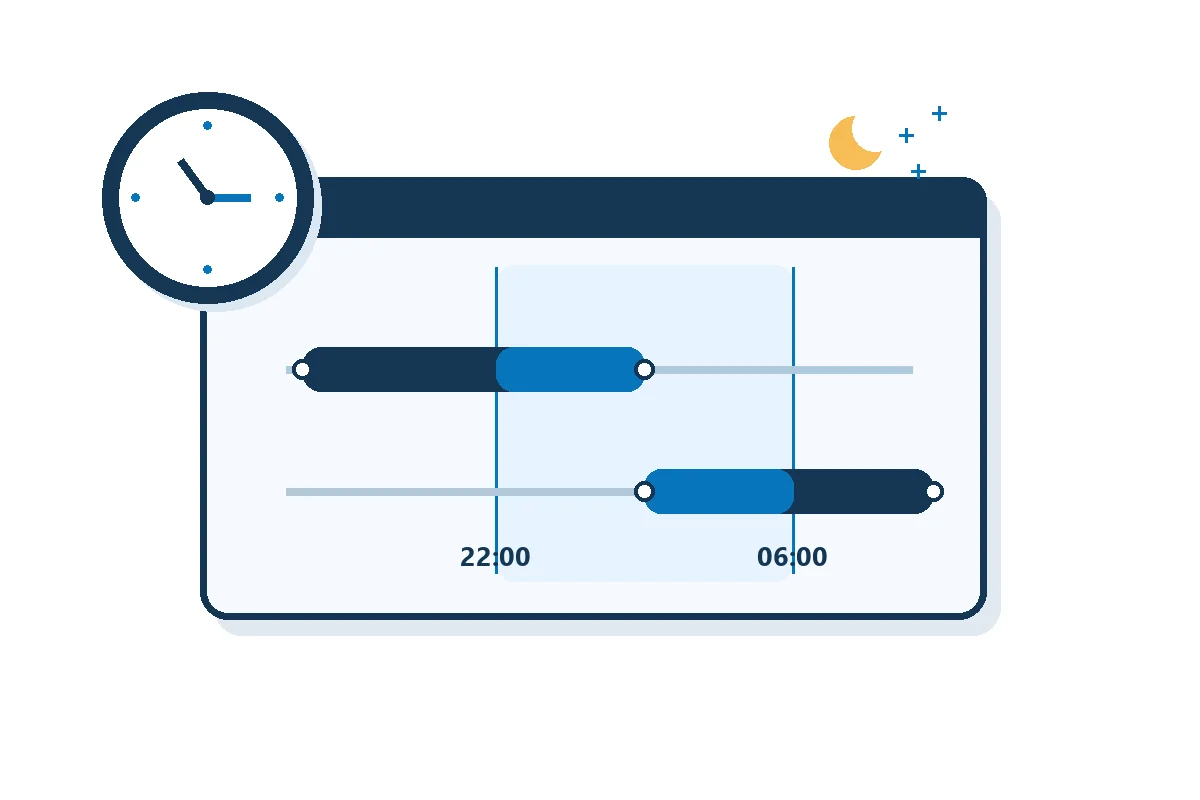

To test a night shift premium before payroll, run two shifts that each overlap the same four hours of the premium window but start on opposite sides of it. A rule that pays only time inside the window should pay four premium hours for each. A rule that pays the whole shift only when it starts inside the window should pay zero for the first and eight for the second. Check the premium hours, rate and earning code for each employee before you approve the rule.
What to keep: a signed test record that shows the expected and actual result for each shift, with any mismatch assigned to an owner.
1. Write down what qualifies
Have payroll and the policy owner agree on the written rule and its effective date before anyone changes a setting. Record the local time zone and dated start and end of the window, eligible roles or locations, which paid intervals count, any minimum duration, and the premium rate and earning code. Note what happens at an exact boundary, when a worker changes jobs during a shift, and when two premiums overlap.
The two rules below are alternative test configurations. TimeTrex’s Contributing Shifts Policies documents Split Shift (Partial), which matches only the portion worked inside the window, and Full Shift (Must Start), which matches the whole shift if it starts inside. It also describes other criteria, including majority of the shift worked and majority of the shift observed. Test the one named in the approved rule; a majority criterion needs separate cases near its threshold.
Use synthetic punches or a payroll test environment that cannot release pay. Keep the rule version, policy group, time zone and effective date fixed for the first run. Have someone who did not configure the rule write the expected results before the operator runs the test.
2. Run two shifts with the same overlap
Assume a premium of $2.00 USD per eligible hour and a local premium window from 22:00 to 06:00 the next day, with no clock change. Both employees are eligible. There is no overtime, stacking, minimum-hours threshold or rounding in this example. These are test inputs, not a required premium or legal rule.
A · Starts before the window
18:00 to 02:00 next day. Eight paid hours; four within 22:00–02:00.
Window only: 4 h × $2 = $8.
Whole shift if it starts inside: 0 h = $0.
B · Starts inside the window
02:00 to 10:00. Eight paid hours; four within 02:00–06:00.
Window only: 4 h × $2 = $8.
Whole shift if it starts inside: 8 h × $2 = $16.
Add a control for breaks and one for zero premium
For a 21:00–05:00 shift with an approved unpaid break from 01:00 to 01:30, the window overlap is seven elapsed hours. Under the illustrative window-only rule, remove the half hour of unpaid time: 6.5 eligible hours × $2 = $13, with 7.5 paid base hours. If the rule is whole shift only when it starts inside, the 21:00 start yields zero premium. A 19:00–21:00 shift produces zero in both configurations. Then test starts and ends exactly at your documented boundary and one minute on either side. Test a clock change or holiday separately if it can affect this policy.
3. Find the first record that disagrees
- Timekeeping reviewer: compare the dated, approved punches and break intervals with your expected paid base hours. If the base is wrong, correct the source through the authorized process before changing the premium.
- Policy owner: if base hours agree but eligible hours differ, inspect the configured criterion, effective dates, filters and stacking. TimeTrex’s Premium Policies documents date/time criteria and circumstances where two premium policies can apply to the same worked time. Two premium rows do not establish two sets of worked hours.
- Payroll reviewer: if eligible hours agree but the earning line differs, verify rate, units, earning code and mapping to payroll. In TimeTrex, Pay Formula Policies define how time converts to pay; the TimeSheet Summary Report can show premium time and associated wages. Use the report as a comparison point, then verify the actual earning detail that payroll will use.
Repeat the same cases after a fix. Compare rows by test employee, dated shift and code. A $16 match is not enough if the employee, quantity or code differs. If the shift also has overtime, paid leave or a contractual premium, have payroll determine the expected treatment separately and add a case for it. This test does not determine pay entitlement or overtime treatment.
4. Record the release decision
Keep a row for each case in your approved test log. Use test IDs rather than real employee details. Record failures with a named owner and retest before approving the change.
Rule version / effective date / local time zone:
Case ID / dated punches and break / eligibility:
Expected base hours / premium hours / rate / code / dollars:
Actual timesheet and payroll detail / differences:
Fix owner / retest evidence / payroll sign-off:
Model the pay after you verify the hours
Once you know the eligible hours, use the TimeTrex Shift Differential Pay Calculator to model pay with those hours. Keep the calculator estimate separate from the evidence that the saved rule classified the actual shifts correctly.