
How to Reconcile Time Clock Transfers Between Worksites
Reconcile a worksite transfer by confirming when the employee left the first site and started work at the next, then assigning each interval to the correct site or travel code. Before approving the timecard, check both the employee’s total payable time and the minutes assigned to each location. The daily total can be right while a site’s labor report is wrong.
1. Rebuild the shift from actual events
Start with the employee’s punch record and the dispatch log, work orders, or supervisor notes for that day. Use the schedule to identify where to look. Ask the employee and site leads to confirm when duties ended at the first site, what happened in between, and when duties began at the next site. Keep any meal or break as a separate interval. If records span time zones, compare the timestamps in one time zone and retain the original times in the correction note.
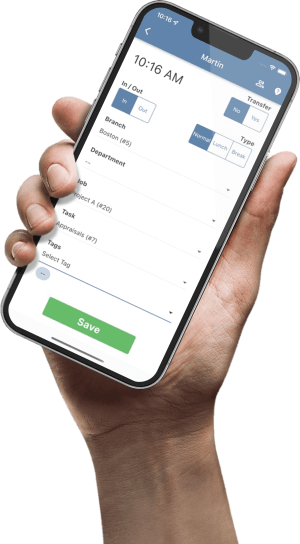
A transfer punch is useful when one assignment ends at the same moment another starts. In TimeTrex, it can change a branch, department, job, or task in one operation. A trip has a departure and an arrival. If your organization tracks that trip separately, a single transfer at arrival leaves the preceding minutes on the original assignment until you account for the travel interval. Check your configured punch and allocation options before setting the procedure. TimeTrex punch documentation.
2. Check the site split and the daily total
Illustrative example. A technician works at Site A from 8:00 to 10:30 a.m., drives to Site B from 10:30 to 11:00 a.m., then works at Site B until 1:00 p.m. The employer treats the drive as paid time and uses a separate travel code. There are no breaks or rounding adjustments in this example.
| Where | Before | After |
|---|---|---|
| Site A | 180 min | 150 min |
| Travel | 0 min | 30 min |
| Site B | 120 min | 120 min |
| Total | 300 min | 300 min |
The technician transferred to Site B at 11:00 a.m. That gave Site A three hours, including the drive. Move 30 minutes from Site A to the travel code. The corrected sum is 150 + 30 + 120 = 300 minutes, or five hours. If the drive had been omitted entirely, the recorded total would be 270 minutes and the correction would also change payable time.
3. Match the correction to the error
- Right time, wrong assignment. When the timestamps and payable minutes are correct, fix the branch or other cost code for the affected interval. Recheck any pay rule driven by the code before approving.
- Gap or overlap. When recorded intervals leave time out or count it twice, verify the disputed minutes with the employee and supervisor. Correct the boundaries from those facts and have payroll confirm any effect on paid time, rates, premiums, or breaks.
- Unconfirmed travel or break. Record the known times and send the disputed interval to payroll with an owner and deadline. A gap between punches alone doesn’t establish what the employee was doing. Follow your payroll team’s process for timely payment and any required correction.
In TimeTrex, a supervisor can review the employee’s punch record and applicable exceptions in the timesheet. If your workflow uses manual timesheets, the documentation explains how to split hours among branch, department, job, or task combinations. Review the other days on that weekly view after changing a coding line. TimeTrex timesheet documentation.
Worksite transfer approval checklist
- Supervisor. Confirm the date, site sequence, departure, arrival, and any breaks with the employee and the relevant site lead.
- Timekeeper. Record the original and corrected intervals, the evidence used, and the reason for each change.
- Payroll reviewer. Confirm that each payable minute is counted once and that the site and travel totals add up to the corrected payable total for the same shift. Review any pay rules affected by the correction.
- Report owner. Rerun the report used for payroll or labor costing and check the affected lines. If the shift was already approved or exported, record who will reapprove it and reconcile any downstream adjustment.
Try the checklist on one shift with a confirmed site change before rolling it out. When the same gap keeps appearing, check whether employees know which punch to use at departure and arrival, and whether the time clock offers the right codes at each location. For teams that already use TimeTrex, the employee request workflow provides a place to submit punch corrections for supervisor review.