


All-in-one workforce management for growing teams
Why TimeTrex Works for Small Businesses in the U.S. and Canada
Twenty-five practical benefits of connecting payroll, time tracking, employee scheduling, leave, HR records, job costing, mobile access, and reporting in one small business workforce management platform.
Quick answer: why TimeTrex is good for small business
TimeTrex for small business is strongest when an owner or manager wants fewer handoffs between the schedule, employee hours, approvals, leave, payroll, and workforce reporting. Instead of maintaining one employee in several disconnected apps, a small business can run a connected process in which approved workforce data becomes the input for payroll and management reports.
That makes TimeTrex especially relevant to hourly, shift-based, field, project-based, remote, and multi-location employers. A simple all-salaried office may not need every capability. But a business that corrects punches, manages schedule changes, tracks PTO, allocates hours to jobs, or operates in both the United States and Canada has more to gain from a small business payroll software with time tracking built into the same platform.
Buyers comparing the best payroll software for small business should look beyond the final paycheck calculation. The better question is whether the software helps the business create clean, approved payroll inputs before payday. TimeTrex connects that upstream work with payroll, HR records, employee self-service, and reporting.
Payroll, time and attendance, scheduling, leave, HR, mobile access, and reports can share one workforce record.
Published workflows include U.S. W-2, 940, 941, and 1099 reporting plus Canadian T4 and ROE documents.
The current trial page says no credit card is required, which gives a small business room to test a real pay-period workflow.
Independent recognition
Highest-rated provider in Forbes Advisor's 2026 small-business payroll guide
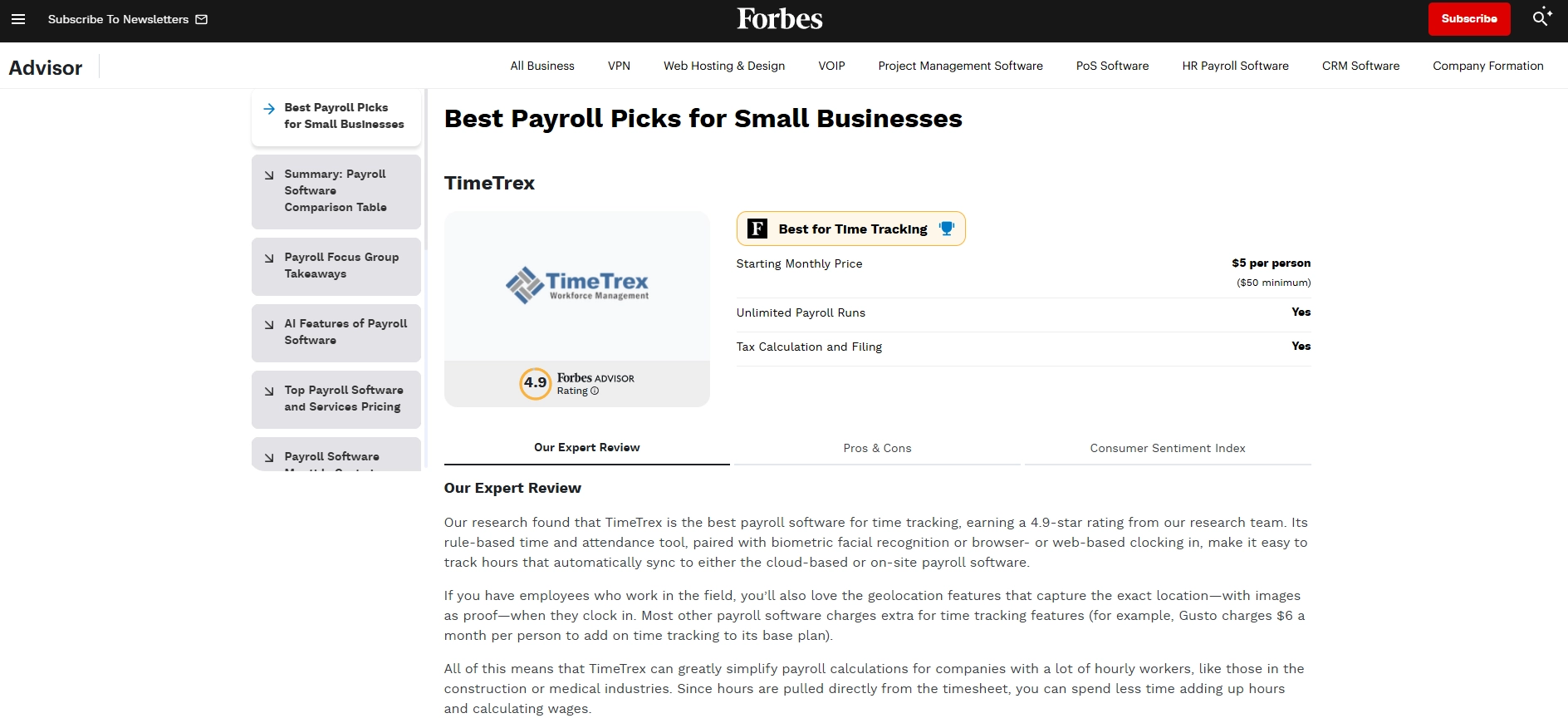
On Forbes Advisor's 2026 Best Payroll Software and Services for Small Business list, TimeTrex was the highest-rated provider shown, earning 4.9/5, and was named Best for Time Tracking.
Forbes Advisor highlighted rule-based attendance, browser and biometric clocking, mobile and geolocation capabilities, and the way recorded hours connect with payroll. Its methodology evaluated 22 providers with 35 metrics and used input from a 50-person focus group of small-business owners, finance leads, and HR decision-makers.
Accuracy note: Forbes says its editorial team determines the ratings. This was not a public vote, so the precise claim is 4.9/5, highest-rated provider shown, and Best for Time Tracking.
Who benefits most from TimeTrex small business software?
TimeTrex can serve many business types, but its connected design creates the clearest value when work hours, locations, schedules, leave, pay rules, and labor costs matter to the paycheck. These are the small-business profiles most likely to see an operational benefit.
Restaurants, retail, and hospitality
A restaurant scheduling and payroll software workflow can connect recurring shifts, availability, open coverage, punches, breaks, approvals, and payroll. That is more useful than maintaining a schedule in one app and importing time into another after every busy weekend.
Construction and field service
Construction payroll and time tracking software becomes more valuable when mobile punches can carry location, job, task, and cost-center context. Corporate Edition adds geofencing and job costing for businesses that need project-level labor visibility.
Clinics and hourly healthcare teams
Healthcare time tracking and payroll software can help managers review schedules, attendance, overtime, leave, qualifications, and pay inputs without building a separate spreadsheet for every shift or department.
Manufacturing and warehousing
Shift coverage, late arrivals, overtime exceptions, departments, tasks, and labor reports all affect production. Connected time and payroll records help supervisors address exceptions while the facts are still fresh.
Professional and nonprofit services
When labor must be assigned to a customer, project, grant, department, or task, payroll software with job costing can turn approved hours into both pay data and a clearer view of how resources were used.
Multi-location and remote employers
Multi-location workforce management software centralizes employee records, branch and department context, schedules, attendance, and reports. It also supports time tracking and payroll software for remote employees through browser and mobile access.
The TimeTrex advantage is the connected workflow
A feature list is only useful if the pieces work together. TimeTrex describes one workforce platform in which scheduling and attendance can feed payroll. The practical small-business value is a controlled chain from the planned shift to the approved paycheck and the report used to understand labor costs.
This is what buyers usually mean when they ask for payroll software that integrates with time tracking, employee hours tracking software for payroll, or scheduling and payroll software for small business. The important distinction is that the workflow is not just a one-way export. Employees and managers can review the source record, correct exceptions, approve the pay period, and then use that approved record downstream.
TimeTrex's product guide describes scheduling, attendance, correction requests, job costing, payroll, and employee visibility as parts of the same workforce management solution.
Benefits 1-5
A cleaner foundation for time, approvals, and payroll
The first five benefits address the recurring small-business problem behind many payroll corrections: payroll receives incomplete, late, or inconsistent information from the systems that record work.
One platform replaces several disconnected workforce tools
TimeTrex Professional brings time and attendance, payroll, scheduling, leave, HR management, reports, browser access, mobile access, and biometric time-clock capability into one published edition. For a lean business, the value is not simply having more features. It is maintaining fewer duplicate employee records and fewer brittle handoffs between tools.
An owner who currently pays for a scheduling app, a time clock, payroll software, and a folder of HR spreadsheets can evaluate TimeTrex as all-in-one payroll and HR software for small business. A shared platform can reduce re-entry, version confusion, and the question of which system contains the current employee status, schedule, or balance.
Small-business outcome: less software fragmentation and a clearer source of workforce data.
Small business payroll software with built-in time tracking
TimeTrex says payroll can be processed from scheduling and attendance data in the same system. That matters because gross pay begins with hours, pay rules, absences, premiums, and approved corrections. A separate payroll engine may calculate taxes correctly while still receiving the wrong number of hours.
With small business payroll software with time tracking, a manager can review the timesheet before payroll rather than discovering a missed punch after an employee sees the pay stub. This is especially useful for a payroll software for hourly employees search, because hourly payroll accuracy depends heavily on upstream attendance controls.
Small-business outcome: fewer manual transfers between approved hours and payroll preparation.
Rule-based time and attendance supports real operating policies
A small business rarely has only one simple time rule. Workweeks, schedules, meal and break policies, overtime, premiums, accruals, departments, locations, and approval paths can differ by role or jurisdiction. TimeTrex describes rule-based time and attendance plus configurable exception policies and restrictions.
That makes it a deeper time and attendance software for small business than a basic clock-in list. Configuration should still follow the business's approved wage-and-hour interpretation; software does not decide legal questions. But once the rule is approved, a consistent policy engine is easier to audit than manager-by-manager spreadsheet logic.
Small-business outcome: repeatable rules and less dependence on memory at each pay period.
Employee requests and corrections can happen before payroll closes
TimeTrex lets employees monitor their scheduling and attendance records and request corrections. Exceptions can identify issues such as a late arrival, overtime, or a missed meal or break condition, depending on the configured policies. Supervisors can focus on the records that need attention rather than rereading every normal timecard.
This creates a practical payroll approval workflow: an employee spots a missing punch, submits the request, a manager reviews the supporting facts, and the approved result becomes available to payroll. The correction is made near the source instead of becoming a retroactive adjustment after payday.
Small-business outcome: earlier exception handling and fewer avoidable employee pay questions.
Payroll and time attendance software creates a traceable chain
When payroll, attendance, schedules, and employee records share a platform, the business can trace a pay result back to the approved source. That is valuable during an employee question, a customer billing dispute, a manager review, or a payroll reconciliation because the team does not have to rebuild the history from emails and exports.
Buyers looking for payroll and time attendance software should test whether the system preserves original facts, approvals, effective dates, and corrections in a way their team can understand. TimeTrex's connected architecture gives a small business a stronger starting point for that evidence chain.
Small-business outcome: more explainable payroll and faster research when a number is questioned.
Benefits 6-10
Flexible time clocks for shops, offices, job sites, and mobile teams
The next five benefits show why TimeTrex can work as employee time tracking software for small business across very different work environments.
Browser, mobile, and biometric time-clock options
TimeTrex supports web-browser punching, iOS and Android mobile access, and facial-recognition time clocks. A business can choose the clocking method that fits the workplace instead of forcing every employee through the same device. Office employees can use a browser, a mobile crew can use a phone, and an on-site team can use a shared clock or kiosk workflow.
That flexibility is useful when evaluating time clock software for small business, a mobile time clock app for small business, or a biometric time clock for small business. Facial recognition is a capability in Professional, while hardware or related biometric services may add fees.
Small-business outcome: one attendance system can support several legitimate ways of working.
GPS and geofencing add context for field punches
TimeTrex mobile access documents GPS location verification, while Corporate Edition adds geofencing. This can help a construction, cleaning, landscaping, home-service, delivery, or mobile-care business confirm where a punch occurred and flag a punch outside an approved area.
A GPS time clock app for field employees is most useful when the business defines a clear work purpose and a proportionate policy. A geofencing time clock for small business should be configured with appropriate notice, consent, access, retention, and privacy controls. Location evidence supports a decision; it should not replace fair review of the employee's explanation.
Small-business outcome: better job-site context without asking supervisors to reconstruct every arrival.
Offline punches support low-connectivity work
TimeTrex says its mobile app can record punches when an internet connection is unavailable and synchronize them after connectivity returns. That is valuable for crews working in basements, rural areas, construction sites, warehouses, or other environments where service is inconsistent.
The offline capability does not remove the need for supervisor review. It reduces the temptation to use a paper note and re-enter the shift later. For payroll software for field service companies or payroll software for small construction companies, keeping the original punch workflow available during an outage can protect both timeliness and context.
Small-business outcome: fewer missing records when connectivity is weak or temporarily unavailable.
Real-time attendance and exception visibility
Managers can see attendance activity and receive exception information while the workday is still underway. A late arrival, early departure, missed punch, overtime condition, or other configured exception can be reviewed sooner than the end of the pay period.
This changes timekeeping from a backward-looking report into an operating tool. The owner can ask a supervisor about a gap today rather than paying someone to investigate it next week. The goal is not constant surveillance. It is prompt, consistent review of the limited set of records that require a decision.
Small-business outcome: managers spend attention on exceptions instead of manually policing normal records.
Kiosk and employee self-service choices reduce bottlenecks
TimeTrex mobile access includes kiosk mode for a shared phone or tablet, while employee self-service lets workers view schedules, timesheets, pay stubs, tax documents, and requests. A small business can centralize the official record without requiring every task to pass through one office administrator.
An employee self-service payroll portal gives employees a direct place to find routine information. That can reduce recurring questions such as when a shift starts, whether a time-off request was approved, what the current accrual balance is, or where to find a pay stub.
Small-business outcome: employees get useful access while managers keep approval control.
Benefits 11-16
Scheduling, leave, pay, and country-specific payroll workflows
These six benefits explain how small business payroll software with employee scheduling can reduce the disconnect between who was planned to work, who actually worked, and what should be paid.
Recurring schedules reduce repetitive weekly setup
TimeTrex supports recurring schedules for regular patterns such as morning, afternoon, evening, rotating, or other repeating shifts. Managers can still override an individual shift without rewriting the rest of the recurring schedule.
That is a practical advantage for an employee scheduling software for small business. A restaurant, clinic, shop, or plant can preserve its normal coverage pattern and spend time on the exceptions. The schedule also carries useful context such as branch, department, job, task, and schedule policy into the broader workforce record.
Small-business outcome: less repeated schedule building and more consistent coverage rules.
Open shifts and availability help cover gaps
TimeTrex can represent open shifts, find available employees, move, copy, or swap scheduled shifts, and notify affected employees. Managers can review availability and scheduled hours when choosing who can cover the work.
This makes the schedule an active staffing tool rather than a static image in a group chat. When an absence changes the plan, the open shift can reappear and be assigned through a controlled workflow. That is useful for retail, hospitality, healthcare, security, and any small business where one uncovered shift affects customers.
Small-business outcome: faster coverage decisions with less text-message confusion.
Leave requests, accruals, and schedules stay connected
TimeTrex supports leave and absence requests, manager decisions, accrual tracking, and employee access to balances. Future absences can affect schedules and flow into attendance and payroll records according to the configured policies.
A leave management software for small business is more valuable when approved time off is not trapped in a separate calendar. Connecting the request, balance, schedule, timecard, and pay code helps the team avoid double entry and gives managers a more accurate view of who is available.
Small-business outcome: clearer balances, fewer scheduling surprises, and cleaner leave-related pay inputs.
Direct deposit, checks, and digital pay stubs support employee choice
TimeTrex documents direct deposit, multiple bank-account options, check printing, digital pay stubs, deductions, garnishments, benefits deductions, and accrual-related calculations. Employee pay methods support ACH for U.S. accounts and EFT for Canadian accounts.
That makes TimeTrex a candidate for payroll software with direct deposit and tax reports. The employee experience matters: a worker can receive pay electronically, access a detailed pay stub, and review the record without waiting for an administrator to print another copy.
Small-business outcome: a more convenient payday experience backed by accessible payroll records.
U.S. payroll reports include W-2, 940, 941, and 1099 workflows
TimeTrex's payroll page lists United States reports such as W-2, 940, 941, and 1099, while the Tax Wizard documents IRS 941 and W-2 steps. The guide shows that some workflows generate a report or electronic file and direct the employer to the relevant government site.
For buyers comparing U.S. small business payroll software, the right question is not simply whether a form name appears on a feature page. Ask which federal, state, and local deposits, filings, notices, credentials, and year-end services are included in the specific plan or Payment Services agreement.
Small-business outcome: documented U.S. payroll reporting tools with a clear path for buyer verification.
Canadian payroll workflows include T4 and Record of Employment documents
TimeTrex documents federal and provincial tax calculations, T4 reporting, CRA source-deduction and T4 Tax Wizard events, and Record of Employment generation. Its ROE guide distinguishes full-service submission from a workflow in which another customer downloads XML and uploads it through ROE Web.
This makes TimeTrex relevant as Canadian small business payroll software, payroll software for small business in Canada, and payroll software with W-2 and T4 reporting for a company operating on both sides of the border. Quebec and other jurisdiction-specific responsibilities should be confirmed in writing before purchase.
Small-business outcome: one workforce platform can support distinct Canadian payroll documents and workflows.
Benefits 17-21
HR organization, labor visibility, and job profitability
TimeTrex extends beyond the pay run. These benefits help a small employer keep useful workforce records and understand where paid labor is going.
Centralized employee records replace scattered HR files
TimeTrex HRM provides a central place for employee information such as contact details, hierarchy, wages, tax and pay methods, qualifications, reviews, accruals, and attachments. The published HR pages also describe job details, emergency contacts, dependents, licenses, and other workforce records.
For a business seeking HR management software for small business, centralization is a practical first win. The owner can reduce the number of private spreadsheets, local folders, and email attachments that must be searched whenever an employee detail changes.
Small-business outcome: a more organized employee record and fewer paper-chase delays.
Skills, licenses, and qualifications can be tracked with expiry details
TimeTrex can store qualifications such as skills, education, licenses, memberships, and languages. Reports can include renewal or expiry information, proficiency, and experience. This helps a manager see whether a worker meets the documented requirements for a role or task.
The value is clearest in healthcare, construction, utilities, transportation, security, and other operations where the right assignment depends on a current credential. The software does not determine whether a license is legally sufficient; it gives the business a structured record to support the approved decision.
Small-business outcome: better visibility into workforce readiness and upcoming renewals.
Performance reviews and employee documents stay with the record
TimeTrex HRM supports employee reviews and attachments. Published pages describe performance reviews, KPI-related information, incidents, interviews, disciplinary actions, contracts, tax forms, and other documents that can be associated with an employee.
Keeping the context together can make onboarding, role changes, coaching, and offboarding more consistent. Corporate Edition adds broader document storage and management. A small business should still define access permissions and retention rules so sensitive records are available only to appropriate people.
Small-business outcome: more consistent HR administration and less dependence on individual inboxes.
Job costing shows where paid labor is being used
Corporate Edition adds job costing. TimeTrex says employees can allocate time across as many as four levels of cost centers, including dimensions such as branch, department, job, task, and quantity. Those dimensions can also support different pay rates or invoicing workflows.
Job costing software for small business helps a contractor, nonprofit, manufacturer, or professional service firm move from total payroll cost to the labor cost of a particular project, customer, grant, work order, department, or task. That information improves estimating, staffing, pricing, and post-project review.
Small-business outcome: payroll becomes a source of project and profitability insight.
Custom reports turn workforce records into operating decisions
TimeTrex publishes customizable reporting across payroll, attendance, scheduling, HR, labor distribution, accruals, exceptions, and job costs. Real-time information can help an owner see overtime concentration, repeated late arrivals, unfilled shifts, payroll totals, or labor charged to the wrong department before those patterns become expensive.
Reports are most useful when the business defines a decision first. For example: Which location creates the most overtime? Which jobs exceed the labor estimate? Which managers approve late? Which employees have expiring qualifications? A focused report makes the platform actionable instead of becoming another archive.
Small-business outcome: faster decisions based on the same records used to run the workforce.
Benefits 22-25
Small-team pricing, growth options, deployment choice, and a low-risk trial
The final four benefits address the buying decision itself: entry price, room to grow, control over deployment and integration, and a practical way to test the software before committing.
Professional Edition is explicitly designed for small businesses
TimeTrex describes Professional Edition as crafted with small businesses in mind. Its published starting price is $50 per month for up to 10 employees and includes the core connected workflow: time and attendance, payroll, biometric facial-recognition time clocks, web punch, mobile access, scheduling, leave, HR, reports, and browser access.
This gives a buyer a concrete entry point instead of a feature list with no public baseline. The pricing page says new accounts may face an activation fee, prices are based on a minimum one-year commitment, and additional biometric-related fees may apply. Confirm the current quote before purchase.
Small-business outcome: a published starting configuration that can be evaluated against current software costs.
Corporate and Enterprise create a growth path
Corporate starts at a published $80 per month for up to 10 employees and adds job costing, geofencing, document management, and invoicing/accounts receivable. Enterprise starts at $100 and adds expense management, recruitment and onboarding, and an advanced applicant tracking system.
Many small businesses may need only Professional. The advantage is having a path to add operational depth without replacing the entire workforce platform. A growing contractor might add job costing and geofencing; a larger hiring program might later need recruitment and expenses.
Small-business outcome: the company can add capability as its process becomes more complex.
Cloud, on-site, integrations, and APIs protect flexibility
TimeTrex offers cloud deployment and publishes an on-site/open-source option for organizations with technical capacity or data-control requirements. Its integration page describes APIs, two-way and flat-file data exchange, plus connections with accounting and payroll systems such as QuickBooks, Sage, ADP, Paychex, and Ceridian.
A cloud deployment is usually the simpler choice for a lean company. On-site control and custom APIs are specialized benefits for a business with internal IT or unusual integration needs. The presence of both options means the platform can serve a straightforward buyer and a technically demanding one without pretending the same deployment fits everyone.
Small-business outcome: more control over how workforce data is hosted and connected.
A 30-day no-credit-card trial lowers buying risk
TimeTrex's current trial page says a business can try the platform for 30 days without a credit card. The Professional page advertises access to features and setup support during the evaluation. A trial is valuable only when the buyer tests a real workflow rather than clicking through menus.
Load a representative employee group, build one real schedule, create normal and exception punches, approve a leave request, close a pay period, and generate the U.S. or Canadian reports the business actually needs. That is the best way to judge whether TimeTrex is the best time tracking and payroll software for small business in your specific operating context.
Small-business outcome: a buyer can validate fit with real work before relying on a sales demonstration.
TimeTrex payroll software for U.S. and Canadian businesses
A cross-border small business needs common workforce data and country-specific payroll execution. TimeTrex can use the same underlying employee, schedule, attendance, leave, approval, and reporting concepts while supporting different documents and payment methods in each country.
| Buyer need | United States | Canada | Question to confirm |
|---|---|---|---|
| Payroll foundation | Approved time, wages, deductions, accruals, and pay policies | Approved time, wages, deductions, accruals, and federal/provincial policies | Which legal entities, states, provinces, and local rules are configured? |
| Payment methods | ACH direct deposit, checks, and digital pay stubs | EFT direct deposit, checks, and digital pay stubs | What funding deadlines, bank formats, fees, and approval steps apply? |
| Document examples | W-2, 940, 941, and 1099 reports or workflows | T4 and Record of Employment documents or workflows | Which forms are produced, filed, submitted, published, or uploaded by whom? |
| Tax Wizard examples | IRS 941 payment and W-2 filing events | CRA source-deduction payment and T4 filing events | Does the purchased service submit directly or prepare a file and link? |
| Employee access | Schedules, timesheets, pay stubs, tax documents, requests | Schedules, timesheets, pay stubs, tax documents, requests | Which mobile and self-service functions will employees use? |
| Country-specific review | Federal, state, local, unemployment, leave, and wage-hour responsibilities | CRA, provincial, Quebec, ROE, leave, and employment-standards responsibilities | Who owns notices, corrections, agency accounts, and year-end reconciliation? |
For U.S. buyers: TimeTrex is a candidate for U.S. small business payroll software with W-2 reports and connected attendance. For Canadian buyers: it is a candidate for payroll and HR software for Canadian small business with T4 and ROE support. In both countries, ask for a written responsibility matrix covering each deposit, filing, form, agency, notice, credential, correction, deadline, and fee.
Which TimeTrex edition fits a small business?
The best edition is the least complex one that covers the business's real workflow. Plan choice should follow what the team will actually use during the next 12 to 24 months, not the longest feature list.
Most small businesses
Professional - starts at $50/month
Published for up to 10 employees. Includes time and attendance, payroll, biometric facial-recognition time clocks, web punch, mobile access, employee scheduling, leave and absence management, HR, customizable reports, and browser access.
Choose it when: the primary goal is an integrated payroll, time, schedule, leave, and HR workflow.
Field and project operations
Corporate - starts at $80/month
Published for up to 10 employees. Adds detailed job costing, geofencing, document storage and management, and invoicing/accounts receivable to the Professional capabilities.
Choose it when: location, jobs, tasks, cost centers, project profitability, or customer billing are material.
Broader talent and expense workflows
Enterprise - starts at $100/month
Published for up to 10 employees. Adds expense management, recruitment and onboarding management, and advanced applicant tracking to the Corporate capabilities.
Choose it when: hiring pipelines and expense workflows justify the added operational scope.
Prices and inclusions were checked August 14, 2026. TimeTrex says pricing is based on a minimum one-year term; activation and additional biometric fees may apply. Confirm the current quote and service responsibilities before buying.
Is TimeTrex right for my small business?
A business is a strong TimeTrex candidate when several of these statements are true. The checklist is more useful than choosing software from a generic feature score.
- Employees work hourly, variable, rotating, overnight, mobile, or project-based schedules.
- Managers correct missed punches or attendance exceptions before most payrolls.
- Scheduling, time tracking, payroll, leave, and HR currently live in separate tools.
- The business needs small business payroll software with built-in time clock controls.
- Employees work across branches, departments, locations, customer sites, or jobs.
- Labor hours need to be assigned to projects, tasks, grants, work orders, or clients.
- Time-off requests and balances are still handled through email or spreadsheets.
- Employees regularly ask managers for schedules, timesheets, pay stubs, or balances.
- The business needs payroll software for U.S. and Canadian businesses.
- Cloud convenience, on-site control, or a custom API is important to the technology plan.
If only one statement applies and the team is entirely salaried with a very simple payroll, a lighter product may be enough. If five or more apply, TimeTrex deserves a realistic trial because the value comes from connecting the problems rather than solving each one separately.
How to test TimeTrex in 30 days
Do not evaluate workforce software with a perfect sample employee. Use one representative team, one real schedule, one normal pay period, and the exception cases that create work today.
| Trial phase | What to test | Evidence to keep | Success measure |
|---|---|---|---|
| Days 1-3: map the workflow | Employees, workweeks, pay periods, schedules, pay rules, leave types, approvals, locations, jobs, and required U.S. or Canadian documents | Current-state map and responsibility list | Every input and owner has a defined destination |
| Days 4-7: configure a pilot | One representative group with real employee roles, clock methods, recurring shifts, accruals, and approval hierarchy | Configuration record and baseline metrics | The test group can complete normal work without workarounds |
| Week 2: create exceptions | Missed punch, late arrival, overtime, leave request, schedule change, offline punch, and employee correction | Requests, alerts, approvals, and audit history | The right person sees and resolves each issue before payroll |
| Week 3: parallel payroll | Approved timesheets, deductions, direct deposit or check output, pay stubs, payroll totals, and country-specific reports | Old-versus-new reconciliation by employee and tax | Differences are explained and configuration is corrected |
| Week 4: decide | Manager usability, employee self-service, reports, integration, support, price, service responsibility, and implementation effort | Decision scorecard and signed responsibility matrix | The buyer can explain the operational and financial value |
Measure missing punches, timecard corrections, approval time, payroll-preparation time, schedule gaps, overtime surprises, employee questions, and job-code completeness. Those measures show whether the connected platform is improving work rather than merely moving it to a new screen.
Test one real schedule and one real pay period
The best way to understand TimeTrex is to run the workflow your business already finds difficult: schedule the team, capture time, create an exception, approve the record, prepare payroll, and inspect the report. That test will reveal more than a generic feature demonstration.
Frequently asked questions about TimeTrex for small business
Is TimeTrex good for small businesses?
Yes, especially for hourly, shift-based, mobile, project-based, or multi-location employers that want payroll, time tracking, scheduling, leave, HR records, and reports in one platform. TimeTrex explicitly says Professional Edition is designed with small businesses in mind.
What rating did Forbes Advisor give TimeTrex?
Forbes Advisor rated TimeTrex 4.9 out of 5 in its 2026 Best Payroll Software and Services for Small Business guide. TimeTrex was the highest-rated provider shown and received the specific designation Best for Time Tracking.
Did Forbes Advisor vote TimeTrex the overall best payroll provider?
No. Forbes says its editorial team determines the ratings; it was not a public vote. The accurate statement is that TimeTrex was the highest-rated provider shown at 4.9/5 and was named Best for Time Tracking.
Does TimeTrex support U.S. small business payroll?
TimeTrex documents U.S. payroll calculations, direct deposit, checks, digital pay stubs, and reports or workflows for W-2, 940, 941, and 1099. Confirm which tax deposits, filings, jurisdictions, notices, and year-end services are included in the purchased plan or Payment Services agreement.
Does TimeTrex support Canadian small business payroll?
TimeTrex documents federal and provincial calculations, Canadian EFT, T4, CRA source-deduction and T4 Tax Wizard workflows, and Record of Employment generation. Confirm Quebec, provincial, ROE submission, remittance, filing, and notice responsibilities in writing.
Does TimeTrex combine payroll, time tracking, scheduling, and HR?
Yes. Professional Edition publishes time and attendance, payroll, scheduling, leave, HR management, reports, browser access, mobile access, and biometric time-clock capability in one platform. Corporate and Enterprise add more operational modules.
Can employees clock in with a browser, mobile app, GPS, or biometric time clock?
TimeTrex documents browser punching, iOS and Android mobile access, GPS information, facial-recognition time clocks, and offline mobile punches. Geofencing is a Corporate Edition feature. Biometric and location use should follow applicable privacy rules and company policy.
Does the TimeTrex mobile time clock work offline?
Yes. TimeTrex says mobile punches can be stored on the device while connectivity is unavailable and synchronized after the connection returns.
Does TimeTrex include job costing?
Corporate Edition adds job costing. TimeTrex documents allocation across up to four cost-center levels and dimensions such as employee, branch, department, job, task, and quantity, which can help project-based businesses understand labor use.
How much does TimeTrex cost for up to 10 employees?
As verified August 14, 2026, published starting prices were $50 per month for Professional, $80 for Corporate, and $100 for Enterprise, each showing up to 10 employees included. Pricing is based on a minimum one-year term; activation and additional biometric fees may apply.
Does TimeTrex automatically file every payroll tax form?
Do not assume universal automatic filing. TimeTrex supports calculations, reports, forms, remittance events, and filing workflows, while some documented steps involve downloading a file and uploading it to an agency site. Ask for a responsibility matrix for every agency, deposit, filing, form, notice, credential, and fee.
Can TimeTrex integrate with accounting or other business software?
TimeTrex publishes API, two-way, and flat-file integration options, including connections with QuickBooks, Sage, ADP, Paychex, Ceridian, and other systems. The buyer should test the exact fields, direction, frequency, error handling, and ownership needed.
Sources and verification notes
Product details, prices, and the Forbes Advisor result were checked August 14, 2026. This article explains product capabilities and buyer workflows; it is not legal, tax, accounting, payroll, employment, or privacy advice. Confirm the current rule, plan, quote, service responsibility, and configuration that apply to your organization.
- Forbes Advisor: Best Payroll Software and Services for Small Business (2026) - TimeTrex 4.9/5, highest-rated provider shown, and Best for Time Tracking; page audited August 3, 2026.
- TimeTrex Professional Edition - Small-business positioning, connected modules, trial, and published benefits.
- TimeTrex feature inventory - Current feature scope and published starting prices.
- TimeTrex pricing - Edition inclusions, one-year term note, activation-fee note, and biometric-fee qualification.
- TimeTrex payroll - Direct deposit, checks, digital pay stubs, deductions, and U.S./Canadian report examples.
- TimeTrex Tax Wizard - U.S. IRS 941 and W-2 plus Canadian CRA source-deduction and T4 workflow details.
- TimeTrex Employee Pay Methods - U.S. ACH and Canadian EFT configuration.
- TimeTrex Government Documents - W-2, T4, and ROE document examples.
- TimeTrex Record of Employment guide - ROE generation and submission-path distinctions.
- TimeTrex Time and Attendance - Browser, mobile, biometric, accrual, restriction, and geofencing capabilities.
- TimeTrex Mobile Access - GPS, geofencing, offline mode, kiosk, schedules, pay stubs, self-service, and job-costing access.
- TimeTrex Employee Self-Service - Employee access to schedules, timesheets, requests, pay stubs, and tax documents.
- TimeTrex Shift Management - Schedule creation, adjustments, self-service, time-off, and schedule visibility.
- TimeTrex Scheduling guide - Manual and recurring scheduling.
- TimeTrex Schedules guide - Shift changes, notifications, Find Available, and schedule context.
- TimeTrex HRM - Employee records, qualifications, attachments, and performance review scope.
- TimeTrex Qualifications guide - Skills, education, licenses, memberships, and languages.
- TimeTrex Job Costing - Four-level cost allocation and labor visibility.
- TimeTrex Job Costing guide - Jobs, tasks, punch tags, branches, departments, rates, and invoicing context.
- TimeTrex Integrations - API, two-way, flat-file, accounting, payroll, and HR connectivity.
- TimeTrex open-source and on-site workforce management - Deployment and technical-control options.
- TimeTrex Community Edition comparison - Current open-source feature and support boundaries.
- TimeTrex 30-day trial - No-credit-card trial path.
- TimeTrex Getting Help - Paid-edition email and telephone support.
- TimeTrex Contact - U.S. and Canadian telephone numbers and current business hours.
- TimeTrex Terms and privacy materials - Payment Services, service terms, and biometric-policy context.


